
How it works
Talk through the work. Leave less for tonight.
Talk. Snap a photo. Review the draft. Field keeps the job moving from the first estimate to approved extras, the invoice, and payment follow-up.
Open Field — FreeThe same job, all the way through
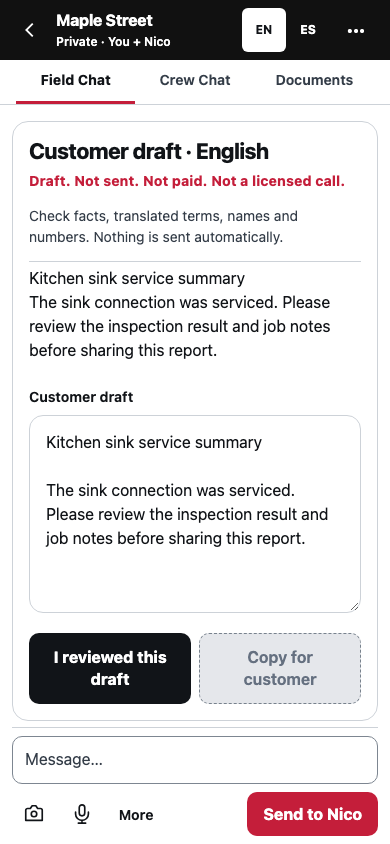
From first conversation to final invoice
- Start without a form.Tell Nico what the job needs, by voice or text. Add photos and keep the details on one job.
- Turn the conversation into an estimate.Ask Nico for an estimate. Review the scope and prices, then share a link so the customer can approve without creating an account.
- Capture extra work before it gets forgotten.Tell Nico what changed. Review the price and get customer approval. Keep the approved changes connected to the invoice.
- Finish the job. Review the invoice.Keep time, receipts, punch items and the day’s record on the job. Prepare the invoice from approved work, check the amounts, and choose to send.
- Keep payment moving.Record deposits and partial payments. See the remaining balance. Nico helps prepare reminders; you review each customer message before sending.
CREW CHATS
Your crew. One conversation. Nico at the table.
Invite coworkers into a crew chat or share a job. Keep notes, photos and Nico’s answers together. English and Spanish display translation helps each person follow the conversation; the original stays available.
Invitations explain what a new participant will be able to see. Review Nico’s summaries and suggestions with the group before treating them as decisions.
Open Crew chatsCrew chats require an internet connection and an enabled shared service. Field shows availability before you start.
Optional: help improve trade intelligence
- Start with your workday. Open Field and tell us where it helps. The work that matters to you should guide what we build next.
- Choose what to share. Your job records stay private by default. Contributing knowledge is a separate choice, and you can use the tools without contributing to model training.
- Help teach through verified expertise. A verified tradesperson can submit a lesson, correction, or explanation for review. Expert contributions enter the training collection only after the required consent, checks, and approval. Each accepted contribution receives a record of credit.
- Tell us what needs attention. Feedback can reveal a missing answer or a problem that deserves another look. Homeowner and other member observations help identify those needs; their submissions never become model training data.
- Keep testing the work. We evaluate answers for accuracy, usefulness, and safety. New knowledge has to earn its place, and we test whether it makes the system better.
Try it on one real job.
Start with the job in front of you. You do not have to move your entire business to ask Nico a question or prepare your first draft.
The knowledge can go further.
Our longer-term ambition includes AI that helps machines work in the physical world. Tradespeople should help shape that future, too. Using contributed knowledge to train robotics requires a separate, optional permission.